
Your e scooter won’t start, the display is frozen, or the throttle has stopped responding. Before you assume it’s a serious mechanical failure, try a reset. Resetting an e scooter clears temporary software glitches, reboots the Electronic Control Unit (ECU), and restores normal function without requiring technical expertise or tools.
This guide covers every reset method for major brands including Xiaomi, Segway Ninebot, and Kugoo. Whether your scooter has a hidden reset button, uses button combinations, or supports app-based resets, you’ll find the exact steps to get back on the road fast.
Locate the Physical Reset Button
Some e scooters include a dedicated reset button designed to be discreet. Finding it is the quickest path to a simple reboot.
Where Reset Buttons Are Hidden
Reset buttons are positioned where they’re unlikely to be pressed accidentally. Check these common locations:
- Near the charging port
- Under the deck or footplate
- Inside the battery compartment
- Close to the handlebar display panel
Use a toothpick, pen tip, or paperclip to press the small recessed button. Apply gentle pressure only.
Reset Button Activation Steps
- Turn the scooter completely off
- Unplug any charger connected to the scooter
- Press and hold the reset button for approximately 10 seconds
- Release the button and power the scooter back on
If successful, the display will reboot, indicator lights will flash, or the system will start normally. This method works like a soft reboot for electronics and resolves minor ECU hiccups such as frozen screens or unresponsive throttles.
Not all models have this button. If you cannot locate one, move to the button combination methods below.
Perform a Power Cycle Reset
When no physical reset button exists, a full power cycle clears residual electrical charge and forces the system to restart.
Basic Power Cycle Procedure
- Turn the scooter off
- Wait 30 to 60 seconds to allow capacitors to discharge completely
- Turn the scooter back on
This simple fix resolves temporary freezes, laggy displays, or erratic behavior. Think of it as restarting your phone when apps stop responding.
Battery Disconnect Method for Stubborn Issues
If standard power cycling fails:
- Power off the scooter
- Remove the battery if your model allows user access
- Wait 2 to 5 minutes
- Reinsert the battery and power on
Opening the scooter or disconnecting internal batteries may void warranties. Only attempt this if your model explicitly permits user access and you’re comfortable with the process.
Reset Xiaomi Scooters

Xiaomi models including the M365, Pro, 1S, 2, 3, 4, and Essential use specific button combinations to trigger hard resets.
Standard Power Button Reboot
For minor issues, hold the power button for 5 to 10 seconds until the LED indicator blinks. This forces a system reboot to clear temporary software errors.
Hard Reset Sequence for Persistent Issues
Use this method when dealing with Bluetooth pairing failures, unresponsive throttles, incorrect battery readings, sudden shutdowns, or when preparing the scooter for resale.
- Ensure the scooter is fully powered off (no LED indicator light visible)
- Using both hands, press and hold simultaneously:
– The brake lever on the left side
– The power button
– The right-side control button near the brake lever - Continue holding all three until you hear a beep sound and the display shows “14” in red
- Release all buttons immediately upon seeing the red “14”
The red “14” appears only once. Do not repeat the sequence unnecessarily. This process erases custom settings and paired Bluetooth devices but does not delete firmware. After resetting, power on normally and reconnect via the Mi Home app.
Reset Segway Ninebot Scooters

Ninebot models including the Max and ES series use different combinations for standard resets versus factory restores.
Standard Combination Reset
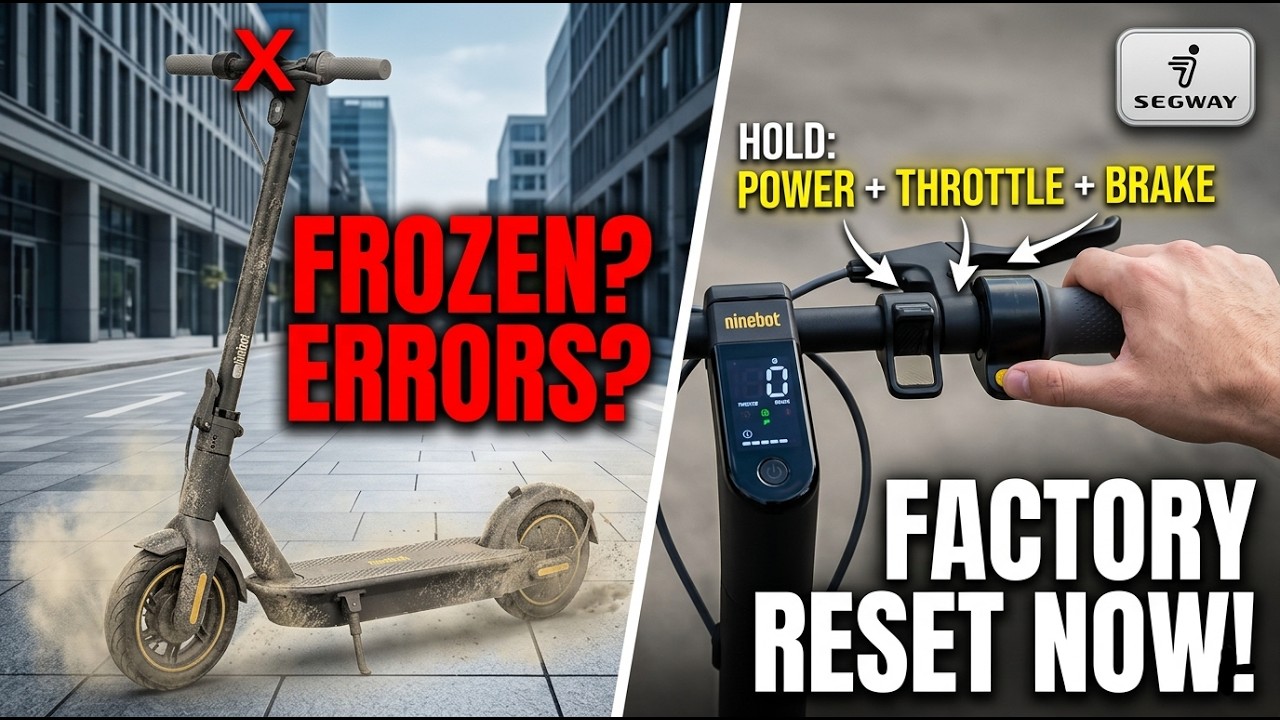
Press and hold the brake lever and power button simultaneously for 3 seconds to clear temporary software errors.
Factory Reset via Button Sequence
- Ensure the scooter is completely powered off
- Press and hold three controls simultaneously:
– Brake lever
– Accelerator or Go button
– Power button - Maintain pressure for 5 seconds
- Watch for a red light on the display indicating the reset has started
- Release all buttons and wait for automatic restart
This returns the scooter to factory settings, clears speed limits and display preferences, and requires re-pairing in the Ninebot app.
Clear Left Brake Error
After firmware glitches or false sensor triggers:
- Turn the scooter off
- Press and hold the Go button and left brake lever
- Press power to turn the scooter on while continuing to hold both buttons
- Keep holding until the display shows “Contact Customer Center” or “Left Brake Error”
- Release both buttons
The error message disappears and normal operation resumes. After any Ninebot reset, open the app and check for firmware updates, as outdated software often causes recurring issues.
Reset Kugoo Scooters
Kugoo Kirin M4 and similar models use a hidden diagnostic menu to reset and clear error codes.
Secret Menu Reset Procedure
- Turn the scooter off
- Press and hold both the + and – buttons simultaneously
- While holding both buttons, turn on the scooter
- A hidden menu appears on the display
- Use the power button to scroll to Option 99
- Select Option 99, then hold the + button for 3 seconds
- The scooter restarts automatically
Upon reboot, the display should show “0” indicating a successful reset with all error codes cleared. Use this method when Bluetooth won’t connect, error codes appear (E1, E2), or performance feels sluggish.
Reset Using Mobile Apps
Many modern e scooters support digital factory resets through companion apps without requiring button manipulation.
Supported Brands and Apps
- Xiaomi (Mi Home App)
- Segway and Ninebot (Ninebot by Segway App)
- Kugoo (Kugoo Ride App)
App-Based Reset Steps
- Open the companion app and pair your scooter via Bluetooth
- Navigate to Settings or Device Info
- Select Factory Reset or Restore Default Settings
- Confirm the action when prompted
The scooter reboots and returns to factory configuration. All custom settings including speed modes, lighting preferences, and paired device history will be erased. After resetting, reconnect the scooter to the app as if it were new.
App-based resets are ideal for fixing persistent connectivity issues, preparing the scooter for resale, or removing someone else’s settings after purchasing a used scooter.
When to Reset Your E Scooter
Reset early if you notice any of these symptoms. A reset should be your first troubleshooting step before checking charging issues, motors, or scheduling repairs.
Common Signs You Need a Reset
- Frozen display that won’t respond to input
- Throttle doesn’t work even when battery is charged
- Battery percentage jumps erratically (80% to 20% to 100%)
- Sudden shutdowns during rides
- Bluetooth won’t connect to the companion app
- Error codes that won’t clear (E1, E2, Left Brake Error)
- Scooter restarts on its own unexpectedly
Troubleshoot a Failed Reset
Sometimes resets don’t work on the first attempt. Try these solutions before assuming hardware failure.
Why Resets May Fail
| Issue | Solution |
|---|---|
| Buttons not registering | Clean around buttons and press firmly with your palm |
| Scooter not fully off | Wait 60 seconds after turning off before starting reset |
| Released buttons too early | Hold combination until visual or audio cue appears |
| Low battery | Charge to at least 20% before attempting reset |
| Corrupted firmware | Update firmware after a successful reset |
If Nothing Works
- Try the reset sequence twice in a row
- Charge the battery fully and retry
- Check the user manual for model-specific steps
- Visit the manufacturer support site or contact customer service
Persistent problems after reset may indicate a failing battery, damaged motor controller, water damage to wiring, or sensor malfunction. These require professional diagnosis.
Prevent Future Reset Needs
Frequent resets signal an underlying issue. Reduce the need with these maintenance habits.
Keep Your Scooter Running Smoothly
- Avoid deep discharges: Don’t let the battery drop to 0%. Recharge at 10% to 20%
- Store properly: Keep in a dry, room-temperature place. Extreme heat or cold stresses electronics
- Clean regularly: Wipe down controls, ports, and display. Dirt interferes with buttons and sensors
- Update firmware: Use the companion app to install updates that fix bugs and improve stability
- Power down correctly: Always turn off using the power button instead of letting the battery drain completely
Reset your scooter once every 3 to 6 months as preventive maintenance, even when it seems fine.
Brand Reset Methods at a Glance

| Brand | Method | Buttons Used | Duration | Confirmation Signal |
|---|---|---|---|---|
| Generic | Physical Button | Hidden pinhole | 10 seconds | System restart |
| Xiaomi | Hard Reset | Brake + Power + Right Button | Until beep and red “14” | Red “14” on display |
| Xiaomi | Soft Reset | Power Button only | 5 to 10 seconds | LED blinks |
| Ninebot | Factory Reset | Brake + Accelerator + Power | 5 seconds | Red light on display |
| Ninebot | Error Clear | Go + Left Brake (while powering on) | Until message appears | Error message clears |
| Kugoo | Secret Menu | + and – → Option 99 → Hold + | 3 second hold | Display shows “0” |
| All Models | App Reset | Via companion app | Instant | Confirmation popup |
Frequently Asked Questions About Resetting E Scooters
How do I reset my e scooter when it won’t turn on?
First, try a basic power cycle: turn the scooter off, wait 30 to 60 seconds, then turn it back on. If that fails, locate any hidden reset button near the charging port or under the deck and hold it for 10 seconds. For models without a reset button, try the brand-specific button combination described above or use the companion app to perform a factory reset.
Will resetting my e scooter delete my settings?
Yes, a factory reset erases all custom settings including speed modes, lighting preferences, and paired Bluetooth devices. However, it does not delete the firmware or core operating system. After resetting, you’ll need to reconfigure your preferences and re-pair the scooter with its app.
Why does my scooter need multiple reset attempts?
Multiple attempts may be needed if the scooter wasn’t fully powered off before starting, buttons weren’t pressed firmly enough, or the battery was too low. Try charging to at least 20% before resetting, ensure you hold button combinations until visual or audio cues appear, and verify the scooter is completely off before beginning.
Can I reset my e scooter without the app?
Absolutely. Most e scooters can be reset using physical buttons or button combinations without any app involvement. The methods described in this guide (physical reset button, power cycle, brand-specific button sequences) all work independently of mobile apps.
What should I do if the reset doesn’t fix my scooter?
If resets don’t resolve the issue, check for firmware updates in the companion app, as outdated firmware can cause recurring problems. Persistent issues after multiple resets likely indicate hardware problems such as a failing battery, damaged motor controller, water damage, or sensor malfunction. Contact the manufacturer or a professional repair service for diagnosis.
Key Takeaways for Resetting Your E Scooter
Resetting your e scooter is the first and most effective troubleshooting step for frozen displays, unresponsive throttles, Bluetooth failures, error codes, and sudden shutdowns. Most issues stem from temporary software glitches that a simple reboot can clear.
Different brands use different methods: Xiaomi scooters require holding the brake lever, power button, and right-side button until red “14” appears. Ninebot models use a brake plus accelerator plus power combination. Kugoo scooters access a hidden menu via the plus and minus buttons. Many scooters also support app-based factory resets through their companion applications.
After any reset, always check for firmware updates, re-pair Bluetooth connections, and reconfigure your preferred settings. If problems persist despite successful resets, the issue is likely hardware-related and requires professional service. With this knowledge, you can confidently troubleshoot most e scooter issues yourself and get back to riding in minutes.



