
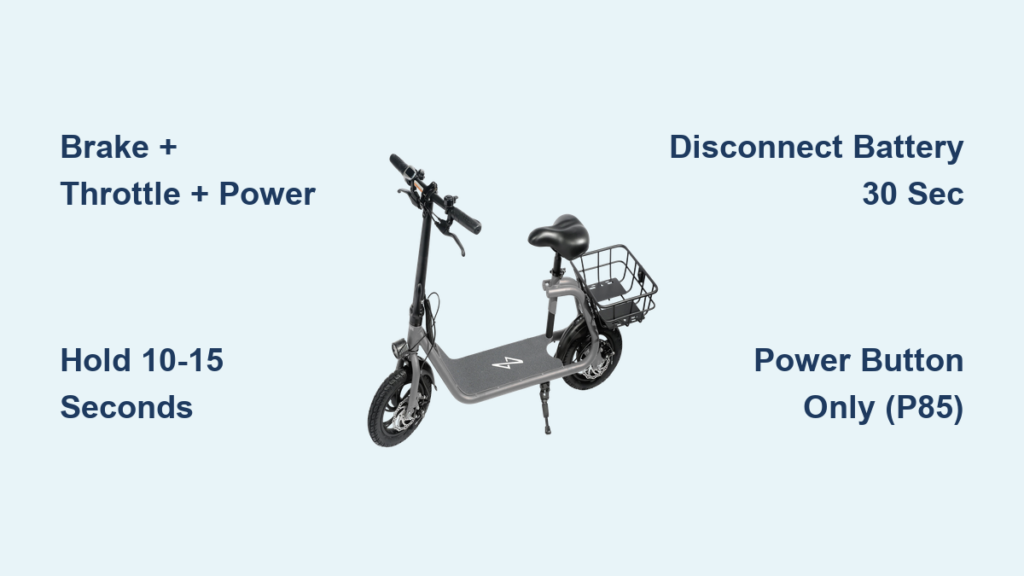
Your Phantom GoGo scooter isn’t responding. The display flashes an error code, the throttle won’t engage, or it won’t power on at all. Before you assume it’s a hardware failure, try a reset. Most common glitches can be resolved in under a minute with the right procedure. This guide covers the exact steps to reset your Phantom GoGo scooter, including model-specific methods for the P85 variant, hard reset techniques, and how to interpret feedback signals.
Whether you’re facing startup issues or erratic control behavior, this step-by-step walkthrough will get your scooter back on track. No tools or technical expertise required.
Standard Reset Procedure

The primary way to fix most software hiccups is the manual reset sequence. This method forces the scooter’s control system to reboot, clearing temporary errors in the electronic speed controller and display module.
Prepare Before Resetting
Before initiating any reset, ensure these conditions are met. First, power off completely. If unresponsive, hold the power button for 3 to 5 seconds until all lights go dark. Second, unplug the charger. Voltage from charging can interfere with the reset logic. Third, place on flat ground. You’ll engage the throttle during reset, so the scooter must be stable to prevent accidental movement.
Execute the Reset Sequence
This three-button combo triggers the system reboot. Follow these steps precisely.
- Hold brake and throttle simultaneously with both hands.
- While holding them, press and hold the power button.
- Keep all three inputs pressed for 10 to 15 seconds.
- Watch for confirmation. The display flashes, an audible beep sounds, or a reset symbol appears.
- Release all buttons at once when feedback occurs.
Pro Tip: Use your index fingers for brake and throttle, with your thumb on power. This grip ensures consistent pressure without slipping.
Verify Reset Success
After releasing the buttons, wait 5 seconds, then power on normally. Test throttle response. It should accelerate smoothly without delay. Check brake function. Both mechanical and electronic braking must engage. Inspect the display. Any prior error codes should be cleared.
If problems persist, proceed to a deeper reset method.
Hard Reset via Battery Disconnection
When the standard reset fails, a hard reset clears residual power from internal capacitors. This is especially effective after firmware glitches or failed updates.
Access and Remove Battery
Turn off the scooter and flip it over to locate the battery compartment. On most 2025 models, the battery slides out from under the deck. Some variants require removing screws with a Phillips head screwdriver. Gently disconnect the battery pack, ensuring you don’t bend pins or damage connectors.
Discharge Residual Power
Wait exactly 30 seconds. This allows full discharge of stored energy in the circuitry. Do not skip this step. Shorter waits may not clear the fault.
Reconnect and Restart
Reinsert the battery firmly until it clicks into place. Reconnect any terminal leads securely, then power on the scooter. If still malfunctioning, repeat the standard reset sequence immediately after reconnection.
Visual Cue: After reconnection, the display should show a full boot cycle, not freeze mid-startup.
P85 Model: Factory Reset Workaround
The Phantom GoGo P85 does not support an official factory reset through menus or standard button combos. However, users have reported a workaround that may restore default settings. This is useful when selling the scooter or troubleshooting persistent firmware bugs.
Attempt Power-Only Reset
Unlike the standard method, this uses only the power button. Ensure the scooter is fully powered off. Press and hold the power button alone. Do not touch the brake or throttle. Continue holding for 10 to 15 seconds. Watch the display closely. If successful, you’ll see a reset animation, default screen, or repeated logo flash. Some units emit multiple beeps. Release the button and let the scooter restart automatically.
Limitations of This Method
This method has several limitations worth noting. First, it’s firmware-dependent. Newer P85 firmware versions may block this reset path. Second, there’s no confirmation message. Absence of feedback doesn’t mean failure. Test functionality afterward. Third, success isn’t guaranteed. It varies by production batch.
Note: If no change occurs, a true factory reset requires Phantom diagnostic software and USB-to-CAN interface tools. These are only available to certified technicians.
Diagnose Error Codes After Reset

Even after a successful reset, some issues may reappear. Use this guide to interpret common post-reset symptoms.
Common Issues Fixed by Reset
The standard reset resolves these frequent problems. The scooter won’t start due to ESC lockout or boot loop. Flashing error codes like E01 or E05 appear from sensor faults or communication errors. The throttle becomes unresponsive due to controller glitches. The display gets stuck on logo from firmware hangs.
When Reset Fails: Next Steps
If the scooter shows no lights at all, no sound during reset attempts, or the battery isn’t recognized after reconnection, the issue may be a dead battery, blown fuse, or damaged main controller. In these cases, professional repair is required.
Timing and Safety Guidelines
Precision matters. Follow these exact timing rules for reliable results.
Critical Durations
Force shutdown requires holding the power button for 3 to 5 seconds. The reset sequence needs 10 to 15 seconds of held inputs. Battery disconnect requires a 30-second minimum wait.
Safety Precautions
Always perform reset on level ground. Keep hands clear of wheels during throttle engagement. Never attempt reset while charging. Wear gloves if handling exposed connectors.
Tool Note: For models requiring panel removal, use only non-conductive tools to avoid short circuits.
Firmware and Model Variability
Not all Phantom GoGo scooters respond identically. Key differences affect which method works best.
2025 vs Older Models
2025 models support visual reset feedback, including flashing screens and symbols. Pre-2025 units may lack audio and visual cues. You’ll need to rely on timing alone.
P85-Specific Behavior
The P85 has no built-in factory reset menu. The throttle and brake method is less effective than on other models. The power-button-only method works intermittently.
Update Tip: Check Phantom’s official app or website for firmware updates after a reset. Outdated firmware increases glitch risk.
When to Contact Support
If you’ve completed all steps and the scooter still fails to operate, professional help may be needed. First, perform the standard reset using brake, throttle, and power. Second, complete the hard reset using battery disconnection and a 30-second wait. Third, try the P85 workaround using the power button hold method.
And still experience no power, persistent error codes, or partial functionality like lights on but no drive. Then contact Phantom Customer Support or visit an authorized service center. They can run diagnostics using proprietary software, perform a true factory reset, and replace faulty controllers or sensors.
Frequently Asked Questions About Resetting Phantom GoGo Scooters
How do I reset my Phantom GoGo scooter when it won’t turn on?
Start with the standard three-button reset. Hold the brake and throttle simultaneously, then press and hold the power button for 10 to 15 seconds. Wait for a beep or display flash, then release all buttons. If this fails, try disconnecting the battery for 30 seconds and attempting the reset again.
What does it mean when my scooter beeps during the reset?
A beep sound during the reset confirms that the system has received the reset command. This is a positive signal indicating the reset sequence was initiated successfully. You should also see the display flash or a reset symbol appear.
Why won’t my P85 reset using the standard method?
The Phantom GoGo P85 does not respond well to the standard brake-throttle-power reset. Try the power-button-only workaround instead. Press and hold just the power button for 10 to 15 seconds while attempting to turn the scooter on. If this fails, the P85 likely requires professional diagnostic tools for a true factory reset.
How long should I wait after disconnecting the battery?
Wait exactly 30 seconds after disconnecting the battery. This duration allows all residual power in the capacitor circuits to fully dissipate. Skipping this step may prevent the hard reset from working properly.
Can I reset my scooter while it’s charging?
No, never attempt a reset while the charger is connected. Voltage from charging can interfere with the reset logic and potentially cause damage. Always unplug the charger before performing any reset procedure.
Key Takeaways for Resetting Your Phantom GoGo Scooter
Most Phantom GoGo scooter issues are software-related and resolve with a simple reset. Always start with the brake-throttle-power hold method as your first troubleshooting step. This handles most startup failures, error codes, and control glitches.
If the standard reset fails, escalate to the battery disconnection method. Remove the battery, wait 30 seconds, then reinsert and try the standard reset again. This hard reset clears deeper electrical residuals that a simple button combo cannot reach.
For P85 owners, the power-button-only workaround offers a last user-level option before professional repair becomes necessary. Remember that firmware variability affects success rates. Check for updates after a successful reset to prevent future glitches.
Keep this guide handy for quick reference whenever your scooter acts up. With precise timing and proper safety steps, you can restore full function in under two minutes, no technician required.



